SEO
Build the technical, architectural, and content systems that make your store easier to discover in organic search.
Explore SEO ↗
Services
Build the technical, architectural, and content systems that make your store easier to discover in organic search.
Explore SEO ↗ Related case studyGrace Rose Farm
See how search revenue grew 77% while organic and AI discovery became a larger acquisition channel.
View case study ↗Learn a simple framework for helping Google find, understand, index, and rank the pages that drive eCommerce revenue—without turning technical SEO into an engineering project.

Partner, Carbon Box Media · Co-Founder, Visible
SEO & CRO specialist with 15+ years designing and ranking websites.
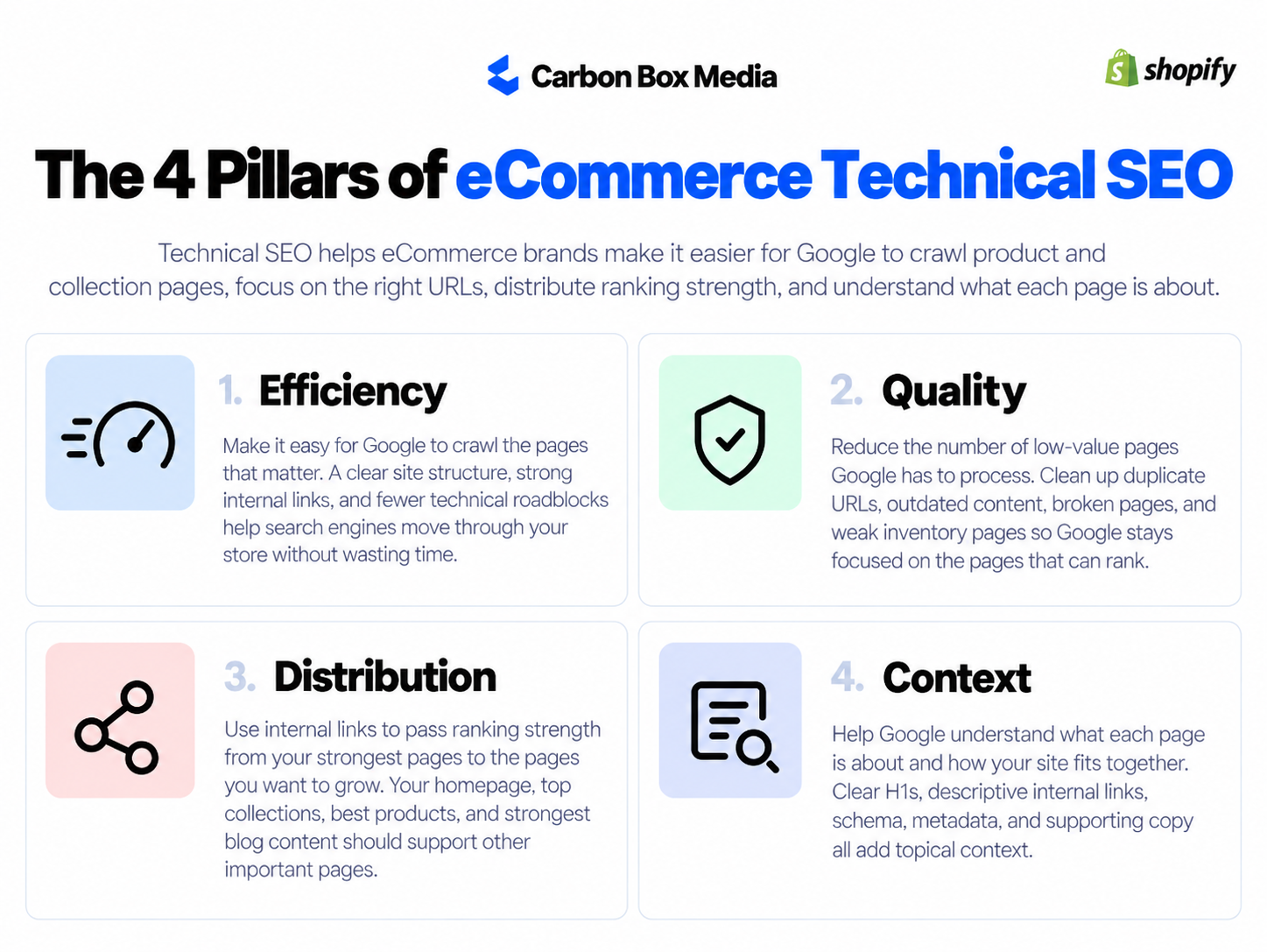
Technical SEO does not need to start with server logs, JavaScript rendering audits, or a 200-line checklist. For most eCommerce brands, the goal is simple: help Google find the right pages, keep the right URLs indexed, understand how the site fits together, and give your most important pages enough authority to compete.
For a practical eCommerce SEO program, those four jobs usually come down to five places: your homepage, collection pages, product pages, internal linking, and indexation. Get those right first; save the advanced technical work for the problems that actually require it.
Every store needs a clean foundation, but technical SEO becomes more valuable in two situations.
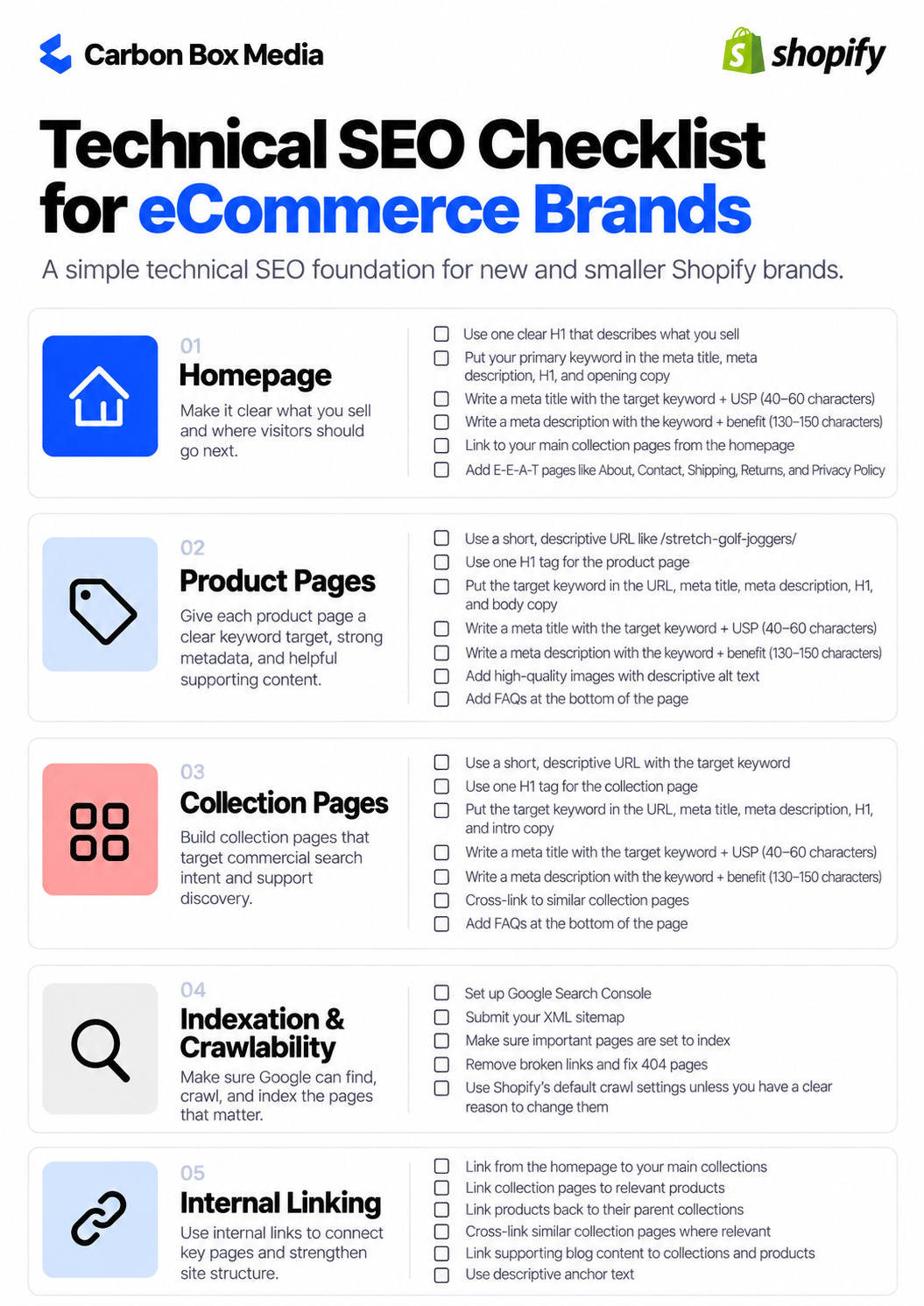
This is the easiest time to get the fundamentals right. You want a homepage that clearly routes users and search engines into your main categories, collections built around real search demand, product pages connected to those collections, clean internal links, and indexation rules that keep weak or duplicate URLs from becoming the foundation of the site.
Getting this right early is much easier than cleaning up years of duplicate collections, broken redirects, orphaned products, and competing URLs later.
Technical SEO also matters when your site has frequent product launches, discontinued SKUs, seasonal collections, multiple developers, merchandising changes, new landing pages, and apps changing the storefront. The problem is not one bad page. It is one bad pattern repeated across hundreds or thousands of URLs.
For a large store, technical SEO is partly change management. Every redesign, collection migration, product retirement, navigation update, and app install can change how authority flows through the site and which URLs Google spends time crawling.
If you are not an SEO specialist, focus on five things first. They cover most of the problems that stop an eCommerce store from turning its existing website into a stronger organic acquisition channel.
Make your primary category and collection pages easy to reach.
What to check ↓Give Google clear commercial pages for the ways customers actually shop.
What to check ↓Keep your products crawlable, canonical, useful, and connected to the right categories.
What to check ↓Move shoppers and authority toward the pages that matter most.
What to check ↓Make sure Google keeps the right URLs and excludes the ones that add little value.
What to check ↓Your homepage is normally one of the strongest and most frequently crawled pages on the site. Do not treat it like a billboard that only links to a “Shop All” page. Use it to establish the main paths through the store.
A simple test: if you removed Google and handed the site to a first-time shopper, could they understand what you sell and reach every important product category from the homepage without searching?
For most eCommerce brands, collection pages are the bridge between broad category demand and individual products. They are often the best pages to target searches such as “men’s trail running shoes,” “goat milk soap for eczema,” or “pink hi-capa parts” because they give shoppers multiple relevant products to compare and buy.
Do not create collections simply because Shopify makes it easy. Create them when there is a meaningful customer need, search pattern, merchandising use case, or navigation role.
Filters are great for shoppers. But when an attribute has meaningful search demand, a purpose-built collection usually gives you more control over the URL, products, copy, metadata, internal links, and long-term indexation. Your filter system can still exist for usability; it just should not be the only way an important search concept exists on the site.
Product pages are where the commercial journey becomes specific. Their technical SEO job is simple: make sure Google can consistently discover one preferred version of the product URL, understand the product, and see how it relates to the collections around it.
If the product is temporarily out of stock, keep the page live when there is a realistic chance it will return. If it is permanently gone, decide whether there is a close replacement. Redirect the old URL only when the replacement genuinely satisfies the same intent. Otherwise, a clean 404 or 410 can be better than forcing users and Google to an unrelated page.
Internal linking is where technical SEO becomes much easier to understand. Search engines discover pages through links, and links also help communicate which pages are important and how topics relate to each other.
Your exact structure will vary, but the principle is the same: important pages should not be buried or depend on one obscure link to be found.
Use anchor text that describes the destination. “Shop men’s hiking boots” gives Google and users more context than another generic “Learn more” link.
Crawling and indexing are not the same thing. Google can discover a URL and still decide not to keep it in the index. Your job is to make the strongest pages easy to find and make weak, duplicate, or unnecessary URLs less prominent.
Open Indexing → Pages. You do not need to panic because thousands of URLs are excluded. Look for important pages in the wrong bucket and patterns that suggest Google is spending time on URLs you do not care about.
Submit the sitemap in Google Search Console and use it as a quality-control list. Important, canonical, indexable pages should be represented. URLs that redirect, return errors, or should not be indexed should not be treated like priority inventory.
You can cover most of this beginner framework with three tools. Add the others when you need deeper debugging.
See what Google is indexing, which URLs have problems, what pages receive impressions and clicks, and whether important pages are being discovered.
Use it for indexation and search visibility.Crawl your site to find broken links, redirects, canonical tags, indexability, headings, crawl depth, and internal-link counts.
Use it to see what the website exposes.Combine site-audit issues with keyword, backlink, and organic-traffic context so you can prioritize problems on pages that have real search opportunity.
Use it to prioritize the commercial impact.Check Core Web Vitals and identify image, JavaScript, layout-shift, and loading problems on your highest-value templates.
Use it when the storefront feels slow.If you want to do a first pass yourself, use this order. It keeps the work focused on pages that can influence discovery, rankings, and revenue instead of chasing every warning in an audit tool.
There is a deeper layer of technical SEO that matters for very large or unusually complex stores: crawl-log analysis, large-scale faceted navigation, JavaScript rendering, internationalization and hreflang, complex migrations, edge rendering, crawl-budget management, and debugging platform-specific indexing problems.
Those topics deserve their own guide. For most growing eCommerce brands, the simpler framework above should come first. A perfectly configured crawl system will not rescue a store whose important collections are missing, products are disconnected from the architecture, internal links are weak, or Google is indexing the wrong URLs.
Technical SEO should make the rest of your SEO strategy easier. Your homepage should distribute authority into the catalog. Collections should give Google clear commercial destinations. Product pages should stay stable and connected. Internal links should make the hierarchy obvious. Indexation should keep attention on the pages worth ranking.
If you remember the four pillars—efficiency, quality, distribution, and context—you can usually tell whether a technical SEO task is worth doing. Ask one question: Will this make an important page easier for Google to find, keep, understand, or rank?
eCommerce technical SEO is the work that helps search engines efficiently crawl the store, keep the right URLs indexed, distribute authority through internal links, and understand the relationship between products, collections, and content.
Yes, but the two overlap. On-page SEO focuses more on the content and optimization of an individual page. Technical SEO focuses more on whether search engines can reach, process, understand, and index the site correctly. For eCommerce brands, architecture and internal linking sit between both disciplines, so this beginner guide intentionally treats them together.
Shopify handles useful fundamentals such as SSL, canonical tags, and sitemap generation, but it cannot decide which collections you should build, how your navigation should distribute authority, whether your internal links are strong, or whether every app and theme change creates the right URLs.
Yes, but keep it simple. A smaller store usually needs a clean homepage-to-collection-to-product architecture, sensible internal links, stable URLs, correct indexation, and fast core templates before it needs advanced crawl analysis.
Start with Indexing → Pages, then confirm your sitemap is submitted. Check whether your most important homepage, collection, product, and content URLs are indexed. Only after that should you spend time investigating large groups of excluded URLs.
Start with Google Search Console. Add Screaming Frog when you want to crawl the website yourself. Ahrefs is useful for combining technical issues with keyword, traffic, and backlink context, while PageSpeed Insights is the simplest way to investigate performance.